
Introduction
XML Compare 10.3.0 introduced comparison of MathML. This feature allows users of MathML to produce a valid, renderable comparison output if MathML inputs are valid and renderable.
How it Works
Using XML Compare's MathML comparison, users will get an output with changes highlighted using the mathbackground attribute. Delta information is also retained if further processing is required. Note that as we are using mathbackground to display change, this may interfere with and overwrite your own use of mathbackground.
If the comparison finds a <math> element (in the http://www.w3.org/1998/Math/MathML namespace) in an input document MathML comparison is switched on automatically. There is also an option to switch MathML comparison off if you do not require it.
Whitespace is normalised as per instructions in the MathML specification i.e. space between elements is removed, and space within elements is normalised (leading & trailing spaces removed, spaces between words collapsed to a single space).
We have found in testing that Firefox is the best browser for rendering MathML.
See the DCP Schema Guide and Javadoc for details of MathML comparison configuration options.
Result Granularity
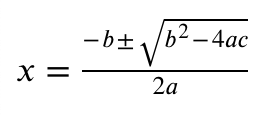
We have provided three levels of granularity of results. To demonstrate the granularity, let's use what should be a familiar formula to many people:
...and make some tweaks...
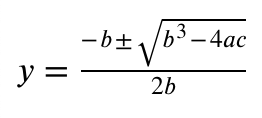
Inline
Inline mode will mark changes at the lowest level (ie. for MathML elements mi, mo, mn) as possible. This is the default mode. We achieve this by wrapping changes in an <mrow> to keep the number of required arguments in certain elements, e.g. <mfrac>, valid.
Using our example, an inline result will look as such:
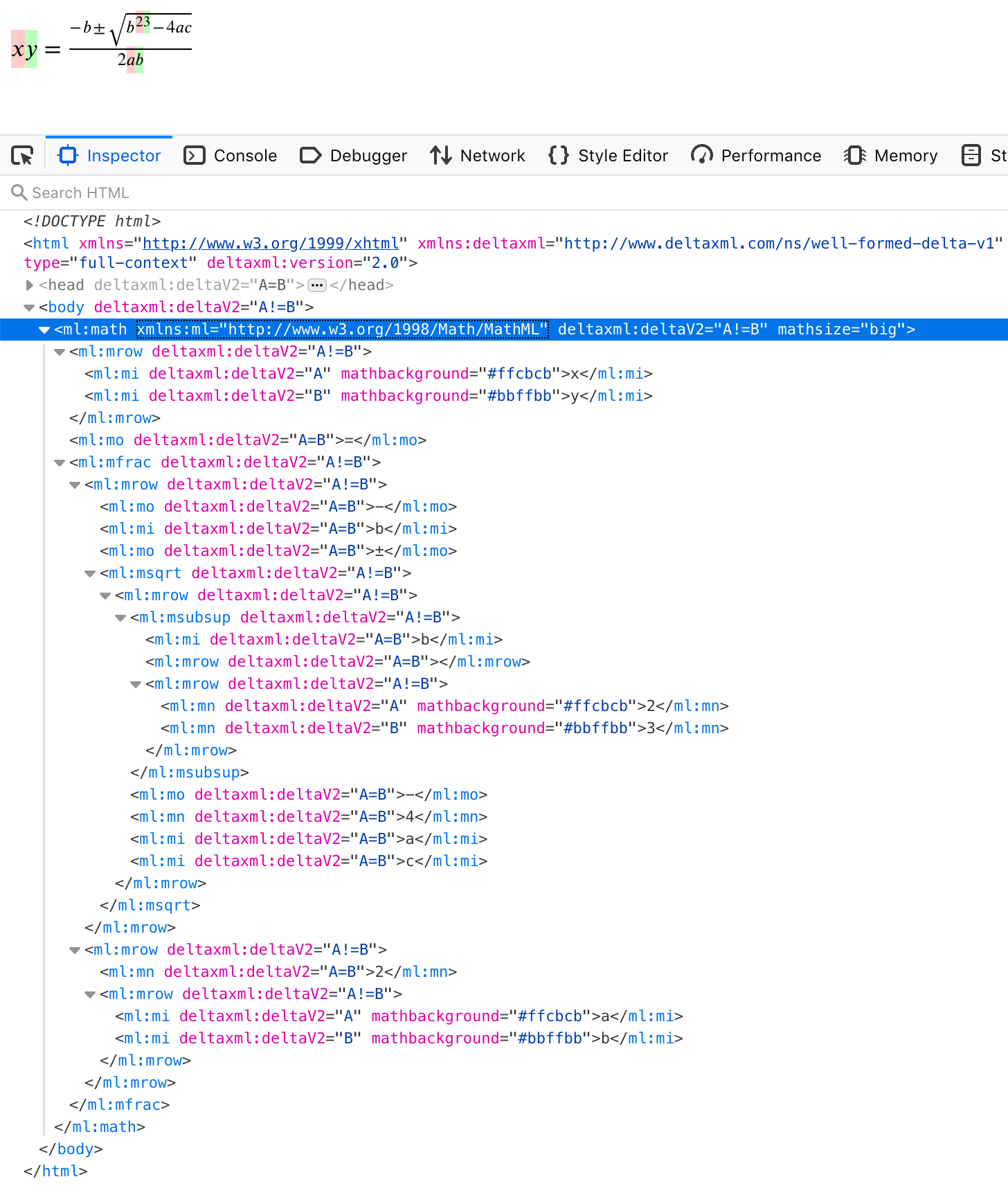
Note for example when changing b2 to b3, the change has been wrapped in an <mrow> to keep <msubsup>'s required arguments correct.
If we cannot display the changes inline, we fall back to producing a "detailed adjacent" view to ensure the output is valid and renderable.
Detailed Adjacent
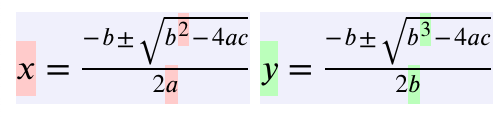
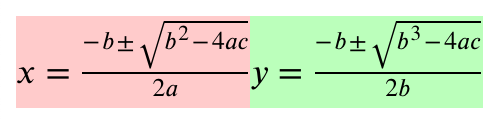
This mode is a side-by-side view that duplicates the inputs, with individual changes highlighted. For readability, we have added a grey background and a small gap between the two formulas.
Here's what our example looks like using this mode:
Adjacent
Adjacent mode is the simplest view and just duplicates the two inputs to give a "before" and "after" view.
Limitations
MathML has been implemented as an M.V.P to garner feedback from customers. As such, there are various limitations to it:
-
We are currently only handling Presentation Markup.
-
Inline comparison will only mark inline changes to
<mi>,<mo>, and<mn>elements. -
If you are using MathML embedded in HTML without a namespace prefix declared, your results will contain MathML prefixed by an autogenerated prefix e.g. "
p0". -
Our comparison presumes your MathML inputs are valid MathML. If they aren't, you may get incorrect results. We may consider validation of MathML inputs in a future release. This would allow us to provide information when inputs aren't valid, and suggest how to fix the errors.
-
We are currently ignoring changes to MathML attributes and resolving by picking the B version.
We do provided catalog for svg and mathml you can do the following below.
java -Dxml.catalog.files=DeltaXML-XML-Compare-10_0_0_j/samples/catalog/catalog.xmlcommand-{version}.jar